I tested a ‘luxury’ nugget ice maker, and it’s an even better investment at this price
Follow ZDNET:Add us as a preferred source. And in the months I’ve had this machine, I’ve used it nearly every single day. So far, it’s surpassed my expectations. Like its predecessor, the Opal is a countertop ice maker that promises to deliver munchable nugget ice right into your own home in a sleek, stylish package….

Follow ZDNET:Add us as a preferred source. And in the months I’ve had this machine, I’ve used it nearly every single day. So far, it’s surpassed my expectations.
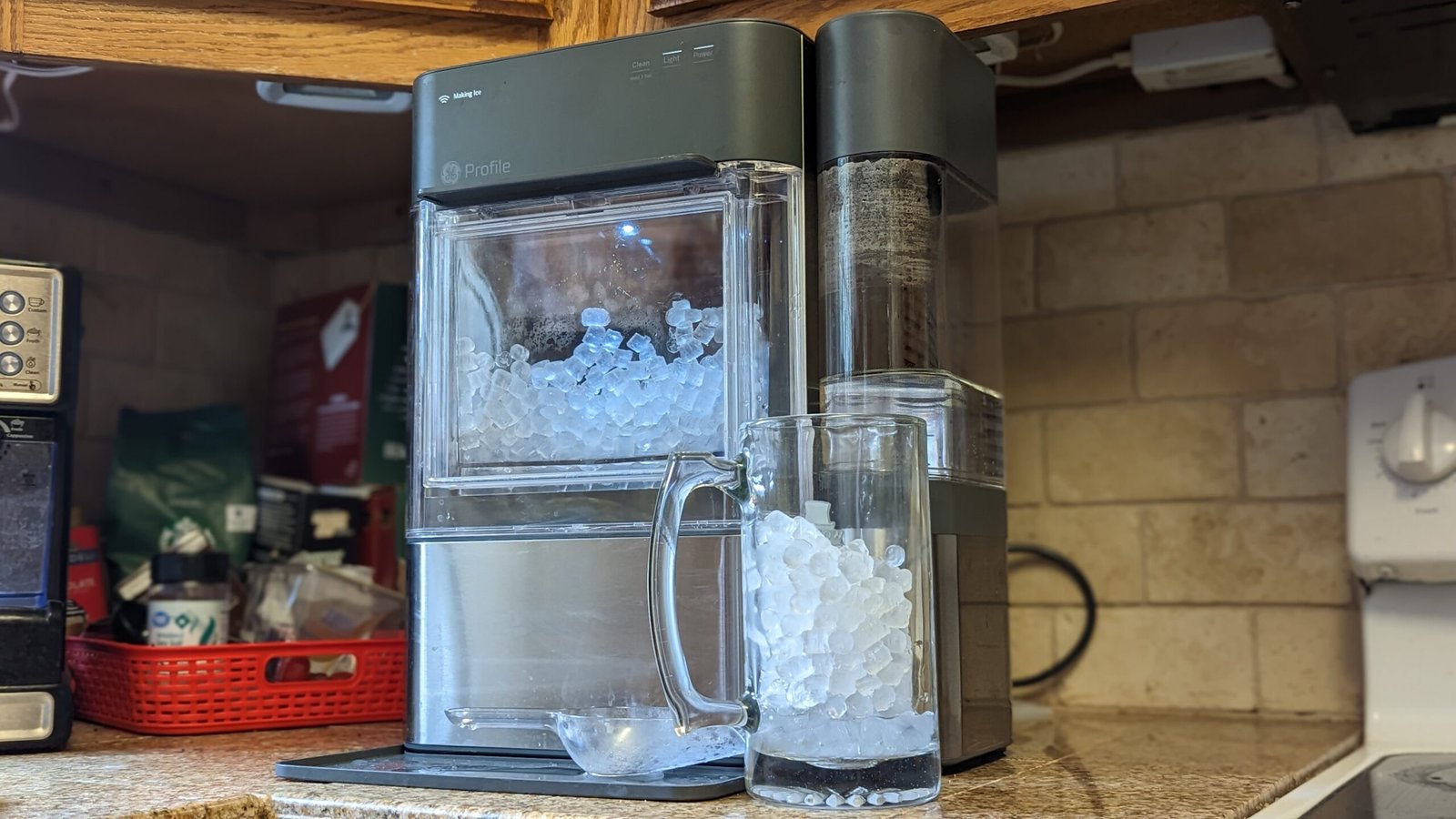
Like its predecessor, the Opal is a countertop ice maker that promises to deliver munchable nugget ice right into your own home in a sleek, stylish package. But the 2.0 version adds many smart features to make getting it as easy as possible.
The unit comes in at 16.5″ high (meaning it fits under most cabinets), 16″ deep, and 13.5″ wide (additional waterside tank included). It takes up a hefty footprint on your countertop, but that’s true of most devices in this category.
Also: Are wind power generators viable at home? My buying advice after months of testing
Setting up the machine was a little cumbersome, but wasn’t too terrible for a one-time process. It involved creating an account and password, verifying each, connecting to both Wi-Fi and Bluetooth, and entering codes from a label on the back of the machine.
While it’s running, the Opal 2.0 makes roughly a pound of ice an hour. There’s no cooler in the catch bin, so you make ice as needed. Any ice that melts in the bin is recirculated into the water reservoir below.
All the smart features for the ice maker live in the Smart HQ app, the current home of all GE smart appliances and products. With the app, you can control the bin light (off, dim, or on), turn on the maker, and set a schedule.
You’ll also receive app alerts when the unit needs cleaning and descaling (a process that just involves removing a filter, running a very diluted bleach solution through the tank, and draining the line), which is about once a month for me, or if the ice bin wasn’t properly replaced.
Also:Unplugging these 7 household devices saved me $200 a year in electricity
So far, the smart features have worked flawlessly. When I first got the device, I set up a preferred schedule, and for over a month, my ice maker has quietly whirred to life at 6 each morning Monday through Friday. The first nuggets hit the bin just before I wake up at 6:15 a.m. When I turned the schedule off for a week when I was out of town, the ice maker stayed silent.
The on/off feature works as intended, as I can toggle the power button in the app and the machine responds a few moments later. This is an especially useful feature when I’m around town, as I can turn the maker on when I’m headed home and arrive at my favorite ice waiting on me.
Of course, it’s also compatible with Alexa and Google Home.
Do you needyour ice maker to be Alexa-compatible? Well, it’s awfully handy sometimes, like when you’re in the living room, and you’d like a cold drink. You can simply speak the command, and ice is on the way. I’m a sucker for smart home tech, and asking Alexa to “make ice” and hearing the machine begin humming in the next room still makes me smile every time.
Also: 10+ powerful Alexa commands you’re probably not using (but should be)
Like a lot of smart home features, I questioned at first whether it would be an option I’d even use, but quickly found it becoming a part of my daily routine.
GE doesn’t tout the Opal 2.0 nugget ice maker
ZDNET’s buying advice
Similar Posts
Microsoft’s new Security Store is like an app store for cybersecurity
Microsoft is launching a Security Store that will be full of security software-as-a-service (SaaS) solutions and AI agents. It’s part of a broader effort to sell Microsoft’s Sentinel security platform to businesses, complete with Microsoft Security Copilot AI agents that can be built by security teams to help tackle the latest threats. The Microsoft Security…
Heres a 5-in-1 charger that simplified travel for me, and with a quality build
ZDNET’s key takeaways The Statik 5–in-1 SmartCharge is a 10,000mAh capacity power bank and charger that sells for $70. It comes with built-in cables and multiple plug adapters (EU, UK, AU) for seamless charging around the globe in more than 200 countries. It’s a great multifunctional charger, but I wish it had a dedicated MagSafe…
Tenways compact e-bike twists and folds to go flat
Tenways just launched its new CGO Compact electric bike in Europe that’s designed to fit into tight spaces like car trunks, apartment hallways, and train compartments. To achieve this, the CGO Compact is fitted with small 20-inch wheels, folding pedals, and a handlebar fitted with a twistable stem to create a slim, wall-hugging profile. The…
Spotify is no longer running ads for ICE
There are no recruitment ads for Immigration and Customs Enforcement (ICE) running on Spotify at the moment, the streaming service has told Variety. A spokesperson has confirmed the news after an ICE agent fatally shot Renee Good in Minneapolis, but they also clarified that the ads stopped running in late 2025. “The advertisements mentioned were…
South Korea opens the door to let Google Maps operate fully | TechCrunch
After years of appeals, Google has finally received conditional approval to export high-precision geographic information out of South Korea, a move that opens the door to let the company provide proper Google Maps services in the country, such as walking and real-time driving directions. The move reverses a long-standing policy on data restrictions that had…
AI-generated art cant be copyrighted after Supreme Court declines to review the rule
The US Supreme Court has declined to hear a case over whether AI-generated art can obtain a copyright, as reported earlier by Reuters. The Monday decision comes after Stephen Thaler, a computer scientist from Missouri, appealed a court’s decision to uphold a ruling that found AI-generated art can’t be copyrighted. In 2019, the US Copyright…